
In our previous article dedicated to the dark side of backing tracks we looked at how to set up an initial rig to reproduce all those elements during a concert that cannot be physically played live by the band.
But what happens when backing vocals, synths, orchestrations, effects, and other parts become essential to the show?
In these cases, the backing track system must become just as reliable as any other instrument on stage.
From backup to redundancy
The simplest setup involves a computer or player connected to a multi-channel audio interface. The sequences are sent to the mixer, while the click and any cues are routed exclusively to the musicians through the monitor or In-Ear system.
The problem is obvious: if the player crashes, the backing track stops.
Naturally, we can have a second computer or player ready to go, but that is simply a backup. A true redundant system does something more: it keeps two playback sources ready simultaneously and allows you to switch from the main one to the secondary one in the event of a problem.
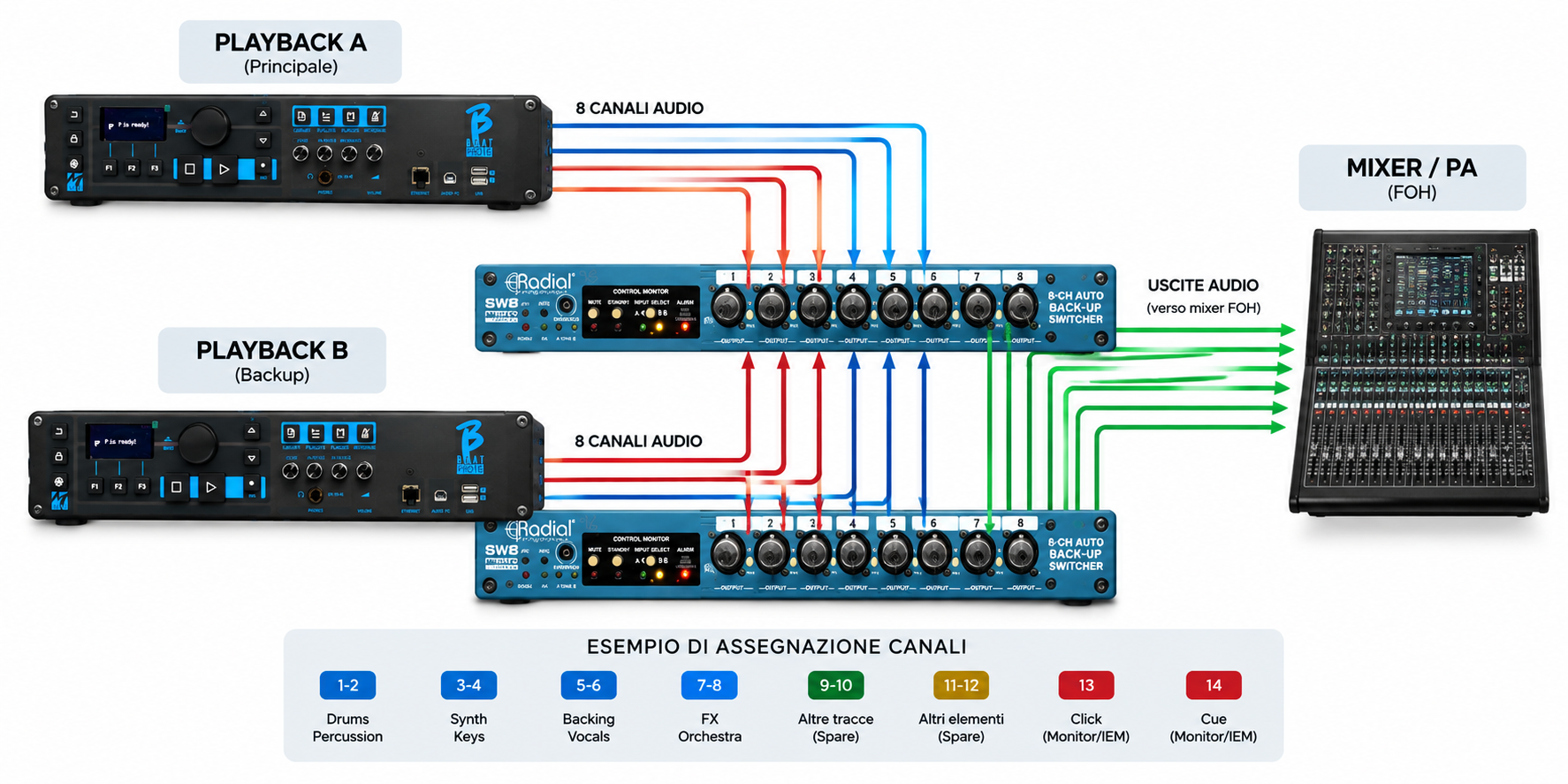
An example of a professional backing track setup
In the photo we used as an example, we can see a particularly comprehensive system: two B.Beat PRO16 players, flanked by two Radial SW8 units dedicated to audio output switching.
Both players can be configured to play the same show. If the main source encounters an issue, the system allows you to switch to the backup playback while maintaining the outputs to the mixer.
Having multiple channels also avoids handing the front-of-house engineer a single stereo mix. We can separate, for example, Drums and Percussion, Synth and Keys, Backing Vocals, FX, Orchestra, and other elements, while naturally keeping the Click and Cues separate and dedicated exclusively to the Monitor/IEM system.
This way, the sound engineer retains greater control over the balance between what is actually played live on stage and the elements coming from the backing tracks.
Why use multiple outputs?
Separating the main elements offers much more freedom during the concert.
If the backing vocals are too loud, the engineer can lower them. If the synths need to cut through more, they can adjust them without altering the entire backing track. The same goes for orchestrations, effects, and other arrangement elements.
Clicks and Cues, on the other hand, are sent exclusively to the musicians and must not reach the PA system.
How complex should our system be?
Not every band needs a rack like the one shown in the photo.
For small live gigs, a computer or player with a good multi-channel audio interface might be enough. Stepping up a level, we can add a second playback unit and a switching system.
In more complex productions, we can reach the point of having two synchronized systems, automatic switching, multi-channel playback, Clicks, Cues, MIDI, and Timecode.
The important thing to understand is that a professional system isn’t necessarily the one with the most gear, but the one properly designed for the needs of the show.
Before the concert: let’s simulate a failure
Finally, there is one test that I always recommend performing.
During soundcheck, let’s start the show and intentionally simulate a failure of the main playback unit.
Does the backup kick in correctly? Do the sequences keep going? Do the click and cues remain active? Does the sound engineer keep receiving the same signals?
If everything continues to work as expected, then we can truly talk about a redundant live backing track system.
A system like this isn’t meant to complicate our lives, but quite the opposite: it ensures that when something goes wrong on stage, the show can go on.